Collaboration

Discuss the asset. Decide. Act.
All in context.

Collaboration in GearJoT isn't a separate chat product. It's channels and threads tied to the equipment, inspections, and issues you're working on. No more forwarding screenshots or losing context in email.
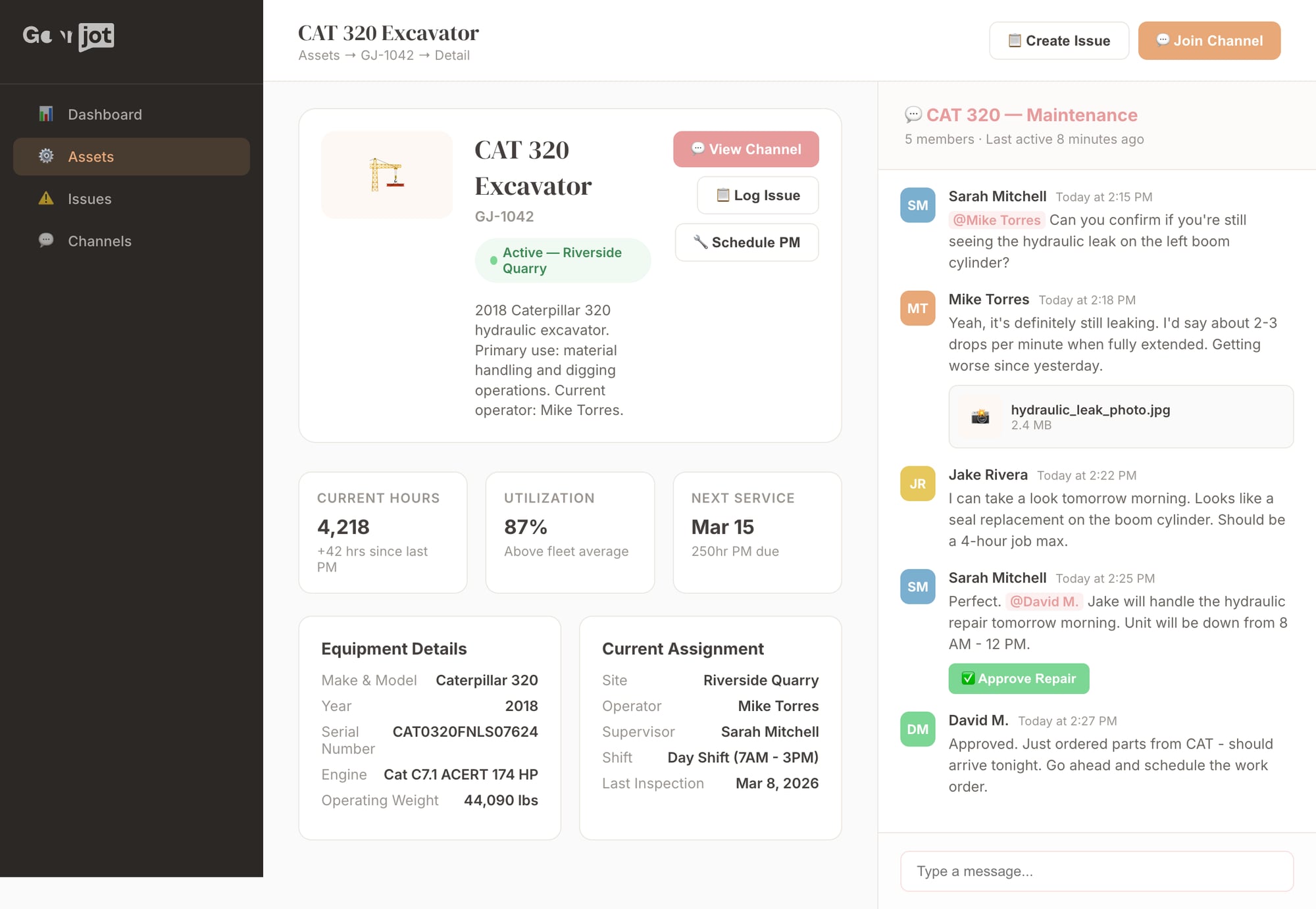
Asset detail with collaboration channel

What changes when conversations live with the work

Faster decisions
Context is right there — no forwarding, no "can you look at this?"
Full accountability
Every decision, approval, and assignment is in the audit trail
🤝
Clean partner handoffs
Dealers and vendors get scoped access — no more email tennis
0
Lost context
New people see the full history when they join a thread

How it works

💬 Channels linked to objects

Every asset, issue, or work order has a channel. Membership follows assignments. One place to talk about "this machine" or "this finding" with the record visible alongside.

🧵 Threads and @mentions

Start threads on messages or objects. @mention people or teams. Reference assets or issues — they show as links. Threads can be resolved; they stay searchable.

🔒 Internal vs. shared

Internal channels for triage and sensitive decisions. Shared channels for dealers, OEMs, and partners. Same asset can have both — no accidental leakage.

✅ Notifications & approvals

Assignment, mention, and status-change notifications. Approvals (sign-off, closure) are first-class: request, approve/reject, and audit trail in one place.

Scoped External Portals

Share specific data with external partners without exposing your entire operation. Insurance adjusters see damage reports but NOT internal cost notes. Vets see health records but NOT financials. Granular, field-level control.

  • Field-level permissions — share damage photos but hide repair costs
  • Role-based portal access — different views for different partners
  • Audit trail of what was accessed and when
  • Branded portals with your company identity
  • Single sign-on or invite-based access
  • Time-limited access with automatic expiration

External Partner Portals

Different access levels for different roles

🏢
Insurance Adjuster
Claims & Damage Assessment
✓ Damage reports
✓ Incident photos
✓ Inspection findings
✓ Timeline of events
✗ Internal notes
✗ Repair costs
🩺
Veterinarian
Health & Medical Records
✓ Health records
✓ Vaccination history
✓ Treatment notes
✓ Lab results
✗ Financial records
✗ Purchase price
🔧
Dealer Service Tech
Maintenance & Repair
✓ Service history
✓ Fault codes
✓ Inspection data
✓ Parts usage
✗ Business financials
✗ Other customers

Permissions Matrix Example

Granular control over what each external partner can see

Data Type
Internal Team
Insurance Adjuster
Veterinarian
Dealer Service
Equipment Details
✓ Full
✓ Basic
✗ None
✓ Technical
Damage Reports
✓ Full
✓ Full
✗ None
◐ Limited
Health Records
✓ Full
✗ None
✓ Full
✗ None
Financial Data
✓ Full
✗ None
✗ None
✗ None
Internal Notes
✓ Full
✗ None
✗ None
✗ None
🔒 Configurable per field, per partner, per asset

Email vs. GearJoT

❌ Email / standalone chat

  • Context in subject lines and attachments
  • New people join without history
  • "Who approved what?" in inbox search
  • External partners get blind forwards
  • Switching between "the system" and "the conversation"

✅ GearJoT

  • Context IS the asset, issue, or inspection
  • Full thread and record in one place
  • Approvals in the operational history
  • Shared channels with scoped access and audit
  • Work and conversation together

Move the conversation
into the system of record.

Context, decisions, and accountability — right where the work happens.